PHP异步(多进程)运行 2021-09-08 15:16:14 - 2024-05-06 00:04:01 無慕 - 1.26K - 4.52分钟 - 584 前提:此命令在windows平台上不可用,且最好是在cli(命令行)下运行(ps:宝塔默认禁用pcntl_fork()函数)。需要用到pcntl_fork()函数,此函数创建一个子进程,父进程和子进程都从fork的位置开始向下继续执行,不同的是父进程执行过程中,得到的fork返回值为子进程号,而子进程得到的是0。const NEWLINE = "\n\n"; if (strtolower(php_sapi_name()) != 'cli') { die("请在cli模式下运行"); } echo "当前进程(执行fork前):" . getmypid() . NEWLINE; //fork出子进程 $pid = pcntl_fork(); //fork后父进程会走自己的逻辑,子进程从处开始走自己的逻辑,堆栈信息会完全复制给子进程内存空间,父子进程相互独立 if ($pid == -1) { // 创建错误,返回-1 die('进程fork失败'); } else if ($pid) { // $pid > 0, 如果fork成功,在子进程中pid为0,而父进程中pid则大于0。 // 父进程逻辑 $time = microtime(true); $thispid=getmypid(); echo "{$thispid}-{$pid}-我是父进程:{$time}".NEWLINE; } else { // $pid = 0 // 子进程逻辑 $time = microtime(true); $thispid=getmypid(); echo "{$thispid}-{$pid}-我是子进程-{$pid}:{$time}".NEWLINE; }补充:getmypid()获取当前进程id。 编程 - 后端 PHP 笔记
PHP的四种运行模式 2021-09-08 14:23:12 - 2024-05-06 00:04:01 無慕 - 733 - 0秒 - 592 一、mod_php一个单独的控制进程(父进程)负责产生子进程,这些子进程用于监听请求并作出应答。Apache总是试图保持一些备用的 (spare)或是空闲的子进程用于迎接即将到来的请求。这样客户端就无需在得到服务前等候子进程的产生。最明显的例子就是在CGI模式下,如果修改了php.ini的配置文件,不用重启web服务便可生效(每次都会加载php.ini的配置,这也是导致性能能地下的一个原因)。而模块模式下需要重启web服务。以mod_php模式运行PHP,意味着PHP是作为Apache的一个模块来启动的,因此只有在Apache启动的时候会读取php.ini配置文件并加载扩展模块,在Apache运行期间是不会再去读取和加载扩展模块的。二、CGI(公共网关接口)当一个服务web-service(nginx)分配过来请求的时候,通过匹配后缀是动态的php的请求。CGI就会去读取php.ini的基本配置信息,初始化环境,创建进程,返回数据,退出进程。每一次请求都是循环往复,所以有些繁琐,这是后面为什么会诞生fastcgi的原因。三、FastCGI(cgi的改进版)这种形式是CGI的加强版本,CGI是单进程,FastCGI多线程的运行方式,程序执行完成之后就会销毁,所以每次都需要加载配置和环境变量fork-and-execute(创建-执行)。而FastCGI则不同,FastCGI 像是一个常驻 (long-live) 型的 CGI,它可以一直执行着,只要激活后,不会每次都要花费时间去 fork 一次。FastCGI进程管理器自身初始化,启动多个CGI解释器进程 (在任务管理器中可见多个php-cgi.exe)并等待来自Web Server的连接。四、CLI命令行运行。 编程 - 后端 PHP 笔记
isset()判断数组有坑,但可用array_key_exists()来填 2021-09-08 14:18:50 - 2024-05-06 00:04:01 無慕 - 680 - 0秒 - 596 array_key_exists() 会检查键值的存在. 这个函数会返回TRUE,只要键值存在,即使值为NULL.$data = array("one" => "1", "two" => "", "three" => null); var_dump(array_key_exists("one", $data));// true var_dump(array_key_exists("two", $data));// true var_dump(array_key_exists("three", $data));// true和arrry_key_exitst()不同,isset()会同时检查键和值,只有当健存在,对应的变量不为NUll的时候才会返回TURE。$data = array("one" => "1", "two" => "", "three" => null); var_dump(isset($data['one']));// true var_dump(isset($data['two']));// true var_dump(isset($data['three']));// false 编程 - 后端 实用 笔记 PHP
PHP运行shell脚本 2021-07-07 16:39:00 - 2024-05-06 00:04:01 無慕 - 1.15K - 0秒 - 598 /** * 执行shell脚本 * @param $shell shell脚本命令 * @param false $is_print 是否打印过程 */ function startshell($shell, $is_print = false) { if ($is_print) { //shell=》shell命令,status=》执行结果的状态,0为成功 echo "<pre>"; system($shell, $status); echo "</pre>"; } else { //shell=》shell命令,result=》执行结果的过程,status=》执行结果的状态,0为成功 exec($shell, $result, $status); } if ($status) { return false; } else { return true; } } 编程 - 后端 PHP方法 PHP
PHP使用Elasticsearch查询之query的用法(bool过滤查询) 2021-06-18 14:05:38 - 2024-05-06 00:04:01 無慕 - 7.02K - 3.97分钟 - 646 下面文章中的方法和其它未说明的内容请前往此文档进行查看:Elasticsearch在PHP中的使用在PHP中使用ELasticsearch查询时,怎样对内容进行检索,怎样将不同的条件像if一样进行and或or的组合查询,这篇文章就来说说这些事。先来看几个查询搜索的例子:单词或多词查询,多个词之间用空格间隔,默认or组合检索,即只要有一个符合就会被检索出来。//单(多)词查询 $search_where = [ 'match' => [ 'title' => [ 'query' => '删库 别烦我',//检索内容,多个词使用空格隔开 ] ] ]; //或者:精简写法(当无其他参数时,推荐词用法) $search_where = [ 'match' => [ 'title' =>'删库 别烦我',//检索内容,多个词使用空格隔开 ] ]; $data = $ES->search_doc($search_where, [], 0, 10);多词查询,为了提高查询精度想要多个条件同时满足,需要用and进行组合检索,因为使用operator操作符,所以不能在使用精简写法。//单(多)词查询,提高精度 $search_where = [ 'match' => [ 'title' => [ 'query' => '删库 别烦我',//检索内容,多个词使用空格隔开 "operator": "and" ] ] ]; $data = $ES->search_doc($search_where, [], 0, 10);多词查询,为了控制精度,需要引入minimum_should_match操作符。minimum_should_match 操作符指的是最小匹配参数,这让我们可以指定必须匹配的词项数用来表示一个文档是否相关。我们可以将其设置为某个具体数字,更常用的做法是将其设置为一个百分数,因为我们无法控制用户搜索时输入的单词数量。$search_where = [ 'match' => [ 'title' => [ 'query' => '区别 推荐 排序', "minimum_should_match"=>"70%" //在此三个词的示例中, 75% 会自动被截断成 66.6% ,即至少匹配三个里面的两个词。 ] ] ]; $data = $ES->search_doc($search_where, [], 0, 10);然后来一个复杂的组合查询:bool过滤查询。此例子查询返回title字段中带有php词项,但不带有Elasticsearch词项的结果,且结果如果还满足mysql词项或者tp词项,那么_score的值将会更高。bool 查询会为每个文档计算相关度评分 _score ,再将所有匹配的 must 和 should 语句的分数 _score 求和,最后除以 must 和 should 语句的总数。must_not 语句不会影响评分;它的作用只是将不相关的文档排除。$search_where = [ 'bool' => [ 'must' => [ 'match' => [ 'title' => [ 'query' => 'php', ] ] ], 'must_not' => [ 'match' => [ 'title' => [ 'query' => 'Elasticsearch', ] ] ], 'should' => [ 'match' => [ 'title' => [ 'query' => 'mysql tp', ] ] ] ] ]; $data = $ES->search_doc($search_where, [], 0, 10);然后先总结一下bool过滤查询的几种类型:Bool查询现在包括四种子句:must、filter、should、must_not①must:返回的文档必须满足must子句的条件,并且参与计算分值。②filter:返回的文档必须满足filter子句的条件,但不会像must一样,参与计算分值。③should:返回的文档可能满足should子句的条件。在一个bool查询中,如果没有must或者filter,有一个或者多个should子句,那么只要满足一个就可以返回。minimum_should_match参数定义了至少满足几个子句。④must_not:返回的文档必须不满足must_not的定义的条件。boost操作符的使用$search_where = [ 'bool' => [ 'should' => [ 'match' => [ 'title' => [ 'query' => 'php', ] ], 'match' => [ 'description' => [ 'query' => 'php', 'boost'=>9//权重更大 ] ] ] ] ]; $data = $ES->search_doc($search_where, [], 0, 10);有关boost使用的补充:当未定义boost时默认为1,。boost参数是用来提升一个语句的相对权重,当大于1时是提高权重,当处于0-1时是讲定权重,但这种提升或者降低并不是线性的,换句话说,如果一个boost的值为2,并不能获得两倍的_score。简单来说,更高的boost值为我们带来更高的_score。 编程 - 后端 Elasticsearch PHP
PHP使用Elasticsearch查询之sort的用法 2021-06-18 13:53:11 - 2024-05-06 00:04:01 無慕 - 800 - 2.87分钟 - 569 下面文章中的方法和其它未说明的内容请前往此文档进行查看:Elasticsearch在PHP中的使用在PHP中使用ELasticsearch查询时,怎样对查询结果进行排序,我分为了三种情况:情况一:当查询中sort条件为空时,Elasticsearch会自动根据检索条件匹配相似度,生成一个相似度的数值_score,而查询结果会按这个_score进行倒序排列。$data = $ES->search_doc($search_where, '', 0, 10);情况二:当只传字段名时,Elasticsearch会按检索结果中此字段的值进行正序排列。$data = $ES->search_doc($search_where, 'age', 0, 10);情况三:组合排序,一个或多个字段进行指定排序时,类似于数据库中order的作用。用法(排序规则,desc倒序排列,asc正序排列):['字段名'=>['order'=>'排序规则'],'字段名2'=>['order'=>'排序规则']]注意:当未指定_score字段时,Elasticsearch不会计算检索条件的匹配相似程度,查询结果中的_score的值为null。$data = $ES->search_doc($search_where, ['age'=>['order'=>'desc'],'_score'=>['order'=>'desc'],], 0, 10); 编程 - 后端 Elasticsearch PHP
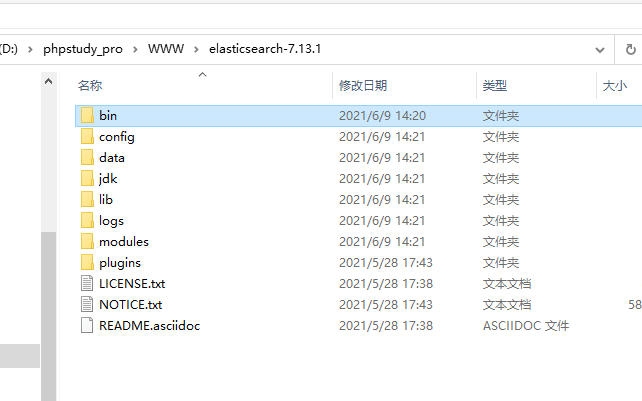
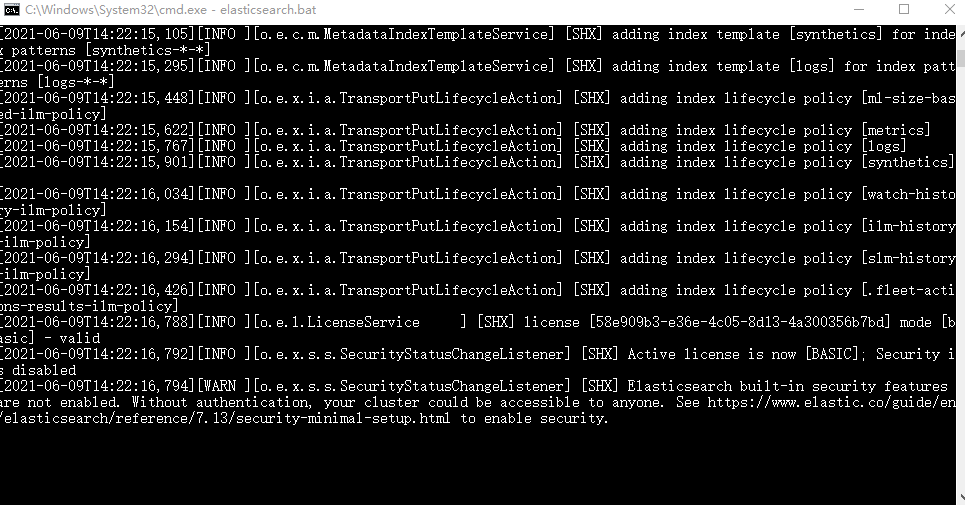
Elasticsearch在PHP中的使用 2021-06-17 10:35:58 - 2024-05-06 00:04:01 無慕 - 2.20W - 12.55分钟 - 625 什么是elasticsearch?Elasticsearch是一个基于java语言开发的分布式多用户的全文搜索引擎,在云计算中,能够达到实时搜索,稳定、可靠、快速,安装方便。官方客户端在java、PHP、Python、.NET等其他语言都是可用的。Elasticsearch 是一个分布式、高扩展、高实时的搜索与数据分析引擎。安装Elasticsearch首先安装java环境,因为Elasticsearch是基于java运行的。参考:java的安装。下载Elasticsearch,建议最新版,其他版本我下载后出现问题,解决非常麻烦。GitHub下载地址:https://github.com/elastic/elasticsearch官方发行版下载地址:https://www.elastic.co/cn/downloads/elasticsearch下载成功后打开根目录样式如下:命令行启动Elasticsearch服务:elasticsearch.bat浏览器访问以下地址,如果如图显示则安装成功!http://localhost:9200/end安装Elasticsearch管理工具:Elasticsearch-Head此工具是为了对Elasticsearch中的数据进行可视化管理,类似于Navicat。安装使用参考查看:Elasticsearch-Head的安装。安装中文分词器:Elasticsearch-analysis-ikElasticsearch-analysis-ik中文分词器是为了将中文搜索条件进行分词搜索使用的。安装使用参考查看:Elasticsearch-analysis-ik的安装。在PHP中安装Elasticsearch1、首先下载composer2、cmd进入项目根目录下3、使用composer命令进行安装:composer require elasticsearch/elasticsearch4、end在TP中使用Elasticsearchuse Elasticsearch\ClientBuilder; class Es extends BaseController { protected $client; public $index_name;//索引值,类似于数据库名 /** * Es constructor. * @param string $index_name 索引名称 */ public function __construct($index_name = "shx") { parent::__construct(); //给定默认值 $this->index_name = $index_name; //自动连接Elasticsearch服务器 $this->client = ClientBuilder::create()->setHosts(['127.0.0.1:9200'])->build(); } /** * ELasticsearch初次使用 */ public function index() { //删除原索引 //$this->delete_index(); //创建新索引 //$this->create_index(); //自定义内容,也可换成数据库内容 $docs = []; $docs[] = ['id' => 1, 'name' => '叶凡', 'content' => '我做的ui界面强无敌。', 'age' => 23]; $docs[] = ['id' => 2, 'name' => '秦昊', 'content' => '我的php代码无懈可击。', 'age' => 24]; $docs[] = ['id' => 3, 'name' => '萧炎', 'content' => 'C的生活,快乐每一天。', 'age' => 29]; $docs[] = ['id' => 4, 'name' => '林动', 'content' => '就没有我做不出的前端页面。', 'age' => 26]; $docs[] = ['id' => 5, 'name' => '唐三', 'content' => 'php是最好的语言。', 'age' => 21]; $docs[] = ['id' => 6, 'name' => '秦宇', 'content' => '别烦我,我正在敲bug呢!', 'age' => 25]; $docs[] = ['id' => 7, 'name' => '宋书航', 'content' => '为所欲为,不行就删库跑路', 'age' => 27]; foreach ($docs as $k => $v) { //添加文档 $this->add_doc($v['id'], $v); } //查看映射(整个index索引的相关信息,不包括数据) //$res = $this->get_mapping(); //搜索结果 $search_where = [ 'bool' => [ 'should' => [ [ 'match' => [ 'content' => [ 'query' => '删库 别烦我',//查询内容 'boost' => 3, // 权重大 ] ] ], [ 'match' => [ 'name' => [ 'query' => '删库 别烦我', 'boost' => 2, ] ] ], ], ], ]; //按照搜索条件,age倒序排列,每页10条数据,查看第一页的数据 //$data = $this->search_doc($search_where, ['age' => ['order' => 'desc']], 0, 10); //按照搜索条件,按照匹配度由高到低排序,每页2条数据,查看第一页的数据 $data = $this->search_doc($search_where, [], 0, 2); dump($data); } /** * 创建索引 * @return array|mixed */ public function create_index() { //给定索引名 $index_name = $this->index_name; // 只能创建一次 $params = [ 'index' => $index_name, 'body' => [ //定义映射中的一些设置 'settings' => [ 'number_of_shards' => 5,//数据分片数,默认为5,有的时候也会用3 'number_of_replicas' => 0//数据备份数,如果只有一台机器,则设置为0 ] ] ]; try { //完成创建索引的映射 return $this->client->indices()->create($params); } catch (Elasticsearch\Common\Exceptions\BadRequest400Exception $e) { $msg = $e->getMessage(); $msg = json_decode($msg, true); return $msg; } } /** * 删除索引 * @return array */ public function delete_index() { //给定索引名 $index_name = $this->index_name; $params = ['index' => $index_name]; //删除指定索引,包括其中的数据映射等 $response = $this->client->indices()->delete($params); return $response; } /** * 查看映射 * @return array */ public function get_mapping() { //给定索引名 $index_name = $this->index_name; $params = [ 'index' => $index_name, ]; //查看指定索引下指定 $response = $this->client->indices()->getMapping($params); return $response; } /** * 添加文档,一次仅插入一条 * @param $id 此条数据索引id * @param $doc 此条数据具体内容,例:['name'=>'shx'] * @return array|callable */ public function add_doc($id, $doc) { //给定索引名 $index_name = $this->index_name; $params = [ 'index' => $index_name, 'id' => $id, 'body' => $doc ]; //添加一条文档 $response = $this->client->index($params); return $response; } /** * 判断文档存在 * @param $id 索引id * @return bool */ public function exists_doc($id) { //给定索引名 $index_name = $this->index_name; $params = [ 'index' => $index_name, 'id' => $id ]; //判断文档是否存在 $response = $this->client->exists($params); return $response; } /** * 获取文档 * @param $id 索引id * @return array|callable */ public function get_doc($id) { //给定索引名 $index_name = $this->index_name; $params = [ 'index' => $index_name, 'id' => $id ]; //获取指定id的文档内容 $response = $this->client->get($params); return $response; } /** * 更新文档,一次仅更新一次 * @param $id 需要更新的索引id * @param $update_data 更新内容,例:['name'=>'shxtest'] * @return array|callable */ public function update_doc($id, $update_data) { //给定索引名 $index_name = $this->index_name; // 可以灵活添加新字段,最好不要乱添加 $params = [ 'index' => $index_name, 'id' => $id, 'body' => [ 'doc' => $update_data ] ]; $response = $this->client->update($params); return $response; } /** * 删除文档 * @param $id 索引id * @return array|callable */ public function delete_doc($id) { //给定索引名 $index_name = $this->index_name; $params = [ 'index' => $index_name, 'id' => $id ]; $response = $this->client->delete($params); return $response; } /** * 查询文档 * @param $search_where 检索条件 * @param array $order 排序,此处如果传空数组,则会按相似度由高到低进行排序。例如:['age' => ['order' => 'desc']] * @param int $from 分页的页数,从0开始为第一页 * @param int $size 分页条数(每页显示多少条) * @return array|callable */ public function search_doc($search_where, $order, $from = 0, $size = 2) { //给定索引名 $index_name = $this->index_name; $params = [ 'index' => $index_name, 'body' => [ //检索条件 'query' => $search_where, //排序内容 'sort' => $order, //页数 'from' => $from, //每页条数 'size' => $size ] ]; $results = $this->client->search($params); return $results; } }重要概念MySQL中的数据库就相当于Elasticsearch的index索引。MySQL中的数据表就相当于Elasticsearch的type。MySQL中的每行数据就相当于Elasticsearch的doument。MySQL中的表字段就相当于Elasticsearch的Field。MySQL中的视图就相当于Elasticsearch的Mapping。注意:MySQL和Elasticsearch无任何直接关系,只是在此举例说明。 注意事项elasticsearch运行是基于java的,所以如果想要使用elasticsearch首先需要安装java环境。如果安装最新版ES插件,请检查PHP版本,例如当前安装elasticsearch7.11,则PHP版本必须大于等于7.1。相关文章PHP使用Elasticsearch查询之sort的用法PHP使用Elasticsearch查询之query的用法(bool过滤查询) 编程 - 后端 Elasticsearch ThinkPHP PHP
PHP是否为车牌号的判断 2021-05-25 14:14:16 - 2024-05-06 00:04:01 無慕 - 3.27K - 0秒 - 608 /** * 车牌号验证 * @param $license * @return bool */ function iscarid($license) { if (empty($license)) { return false; } //匹配民用车牌和使馆车牌 // 判断标准 // 1,第一位为汉字省份缩写 // 2,第二位为大写字母城市编码 // 3,后面是5位仅含字母和数字的组合 $regular = "/[京津冀晋蒙辽吉黑沪苏浙皖闽赣鲁豫鄂湘粤桂琼川贵云渝藏陕甘青宁新使]{1}[A-Z]{1}[0-9a-zA-Z]{5}$/u"; preg_match($regular, $license, $match); if (isset($match[0])) { return true; } //匹配特种车牌(挂,警,学,领,港,澳) //参考 https://wenku.baidu.com/view/4573909a964bcf84b9d57bc5.html $regular = '/[京津冀晋蒙辽吉黑沪苏浙皖闽赣鲁豫鄂湘粤桂琼川贵云渝藏陕甘青宁新]{1}[A-Z]{1}[0-9a-zA-Z]{4}[挂警学领港澳]{1}$/u'; preg_match($regular, $license, $match); if (isset($match[0])) { return true; } //匹配武警车牌 //参考 https://wenku.baidu.com/view/7fe0b333aaea998fcc220e48.html $regular = '/^WJ[京津冀晋蒙辽吉黑沪苏浙皖闽赣鲁豫鄂湘粤桂琼川贵云渝藏陕甘青宁新]?[0-9a-zA-Z]{5}$/ui'; preg_match($regular, $license, $match); if (isset($match[0])) { return true; } //匹配军牌 //参考 http://auto.sina.com.cn/service/2013-05-03/18111149551.shtml $regular = "/[A-Z]{2}[0-9]{5}$/"; preg_match($regular, $license, $match); if (isset($match[0])) { return true; } //匹配新能源车辆6位车牌 //参考 https://baike.baidu.com/item/%E6%96%B0%E8%83%BD%E6%BA%90%E6%B1%BD%E8%BD%A6%E4%B8%93%E7%94%A8%E5%8F%B7%E7%89%8C //小型新能源车 $regular = "/[京津冀晋蒙辽吉黑沪苏浙皖闽赣鲁豫鄂湘粤桂琼川贵云渝藏陕甘青宁新]{1}[A-Z]{1}[DF]{1}[0-9a-zA-Z]{5}$/u"; preg_match($regular, $license, $match); if (isset($match[0])) { return true; } //大型新能源车 $regular = "/[京津冀晋蒙辽吉黑沪苏浙皖闽赣鲁豫鄂湘粤桂琼川贵云渝藏陕甘青宁新]{1}[A-Z]{1}[0-9a-zA-Z]{5}[DF]{1}$/u"; preg_match($regular, $license, $match); if (isset($match[0])) { return true; } return false; } 编程 - 后端 PHP方法 PHP
PHP两个时间戳之间的间隔天数,按照日期算 2021-05-08 09:34:53 - 2024-05-06 00:04:01 無慕 - 420 - 0秒 - 605 /** * 两个时间戳之间的间隔天数,按照日期算 * @param $time1 * @param $time2 * @return mixed */ function interval_days($time1,$time2) { $cha = date_diff(date_create(date('Ymd', $time1)), date_create(date('Ymd', $time2))); return $cha->days; } 编程 - 后端 PHP方法 PHP
PHP计算两个时间段交集时间 2021-05-08 09:34:34 - 2024-05-06 00:04:01 無慕 - 922 - 0秒 - 614 /** * PHP计算两个时间段交集时间 * @param int $beginTime1 开始时间1 * @param int $endTime1 结束时间1 * @param int $beginTime2 开始时间2 * @param int $endTime2 结束时间2 * @return int */ function is_time_cross($beginTime1 = 0, $endTime1 = 0, $beginTime2 = 0, $endTime2 = 0) { //////////剔除没有交集的情况,在一段时间的两侧情况 if (($beginTime1 < $beginTime2 && $endTime1 = $endTime2 && $endTime1 > $endTime2)) { return 0; } /////////假设一段时间在另一段时间之内的情况 //当time2完全在time1的范围内时 if ($beginTime2 >= $beginTime1 && $endTime2 = $beginTime2 && $endTime1 <= $endTime2) { return $endTime1 - $beginTime1; } /////////假设一段时间在另一段时间开始或结尾处 //当time1范围在$beginTime2范围左右时 if ($beginTime1 < $beginTime2 && $endTime1 > $beginTime2) { return $endTime1 - $beginTime2; } //当time1范围在$endTime2范围左右时 if ($beginTime1 < $endTime2 && $endTime2 < $endTime1) { return $endTime2 - $beginTime1; } //当time2范围在$beginTime1范围左右时 if ($beginTime2 < $beginTime1 && $endTime2 > $beginTime1) { return $endTime2 - $beginTime1; } //当time2范围在$endTime1范围左右时 if ($beginTime2 < $endTime1 && $endTime1 < $endTime2) { return $endTime1 - $beginTime2; } } 编程 - 后端 PHP方法 PHP